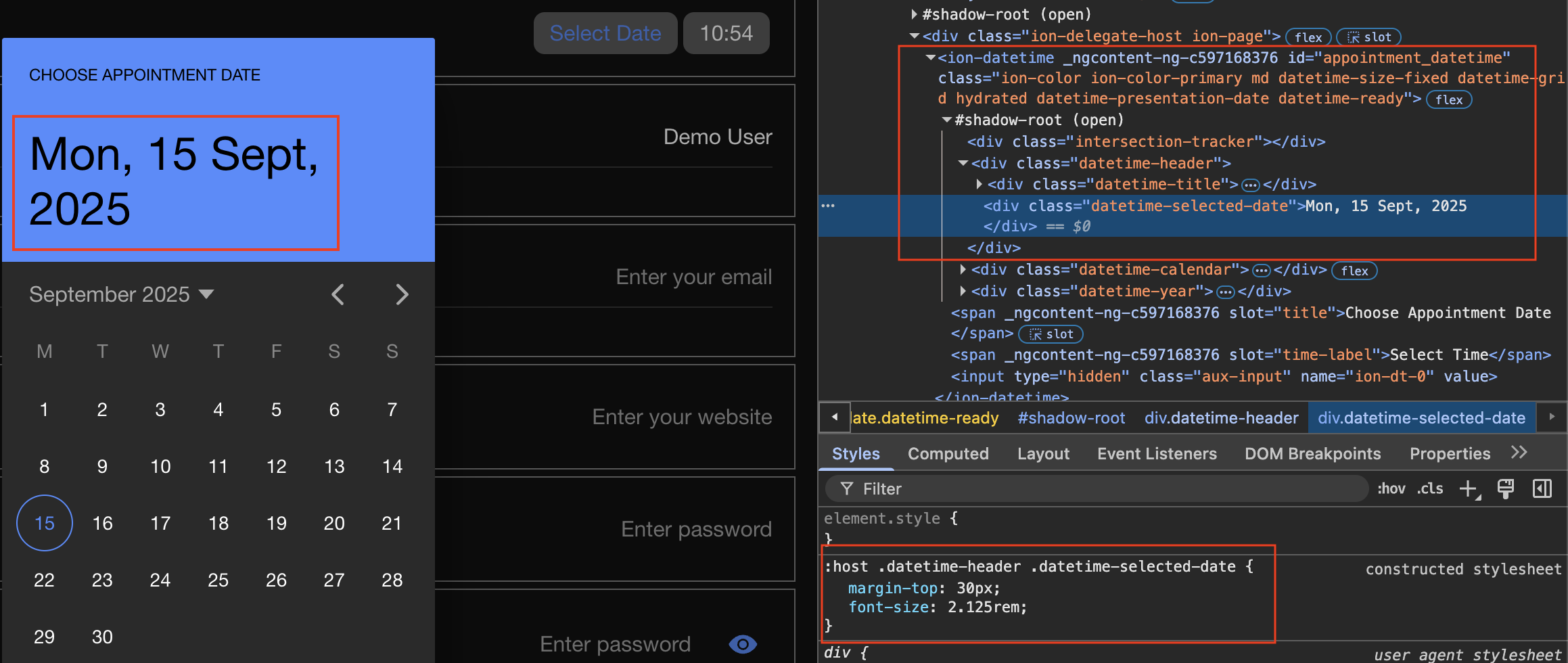
I’m using ion-datetime & ion-datetime-button in my form. I’m using title slot like this
Choose Appointment Date
It includes whole div with class datetime-header. No any CSS Shadow part for this.
(1) How can i change font-size or hide this div class datetime-selected-date using CSS.
I tried in global.scss with !important but its not working.
There are many div classes in ionic where shadow part needs to be exposed, so in CSS we can easily target it.
(2) How can i manually assign css shadow part attribute myself in ionic?
I tried editing this file: node_modules/@ionic/core/components/ion-datetime.js
return (h(“div”, { class: “datetime-header” }, h(“div”, { class: “datetime-title” }, h(“slot”, { name: “title” }, “Select Date”)), showExpandedHeader && h(“div”, { class: “datetime-selected-date”, part: “demotest” }, this.getHeaderSelectedDateText())));
This assigns a part “demotest” when i rebuild ionic prod. Not working on ionic serve.
I don’t think this tricky method is a good solution as my changes will be erased on updates.
(3) Is there any standard recommended way to modify/extend/override default ionic components html template? So we can self customise it with required part attributes and css classes customization.