ramose
July 31, 2014, 2:10am
1
Hi all,
I have a project that have a list view, showing video on each list item. All data is retrieved from remote json file.
My code is this
<video ng-src="http://www.jeembastudio.com/gtp/video/{{item.source}}" controls width="250"></video>
but all video not show up.
<video ng-src="http://www.jeembastudio.com/gtp/video/video1.mp4" controls width="250"></video>
and there is no problem with <img/>, only <video> tag cause the unwanted result.
Any hint? Thanks
ramose
July 31, 2014, 3:54pm
2
I found the solution:
set Strict Contextual Escaping to allow access to my server.
$sceDelegateProvider.resourceUrlWhitelist(
    [
     'self',
     'http://jeembastudio.com/**'
    ]
   );
ramose
August 1, 2014, 7:32am
3
Actually this is not working on android, since android has problem with <video> tag. But ios has no problem with this.
Please share if you know the workaround
hey there,
i built a directive for that.
So my directive has one attribute where the src is stored.
<video .... dynamic-src dynamic-src-path="{{path}}">
My directive fills element.src with the value of dynamic-src-path.
Greetz, bengtler.
ramose
August 1, 2014, 8:36am
5
Hi bengtler,
can you explain or share the code?
I was just get into angular and custom ‘directive’ stuff. Based on your explanation, I made this but no luck.
in my controller:
.directive('myVideo', function(){
  return function(scope, element, attrs){
    var dir = {};
    dir.restrict = 'A';
    attrs.src = scope.item.video;
  }
})
and my html (inside ng-repeat) :
<video src="" controls width="250" my-video></video>
In a template
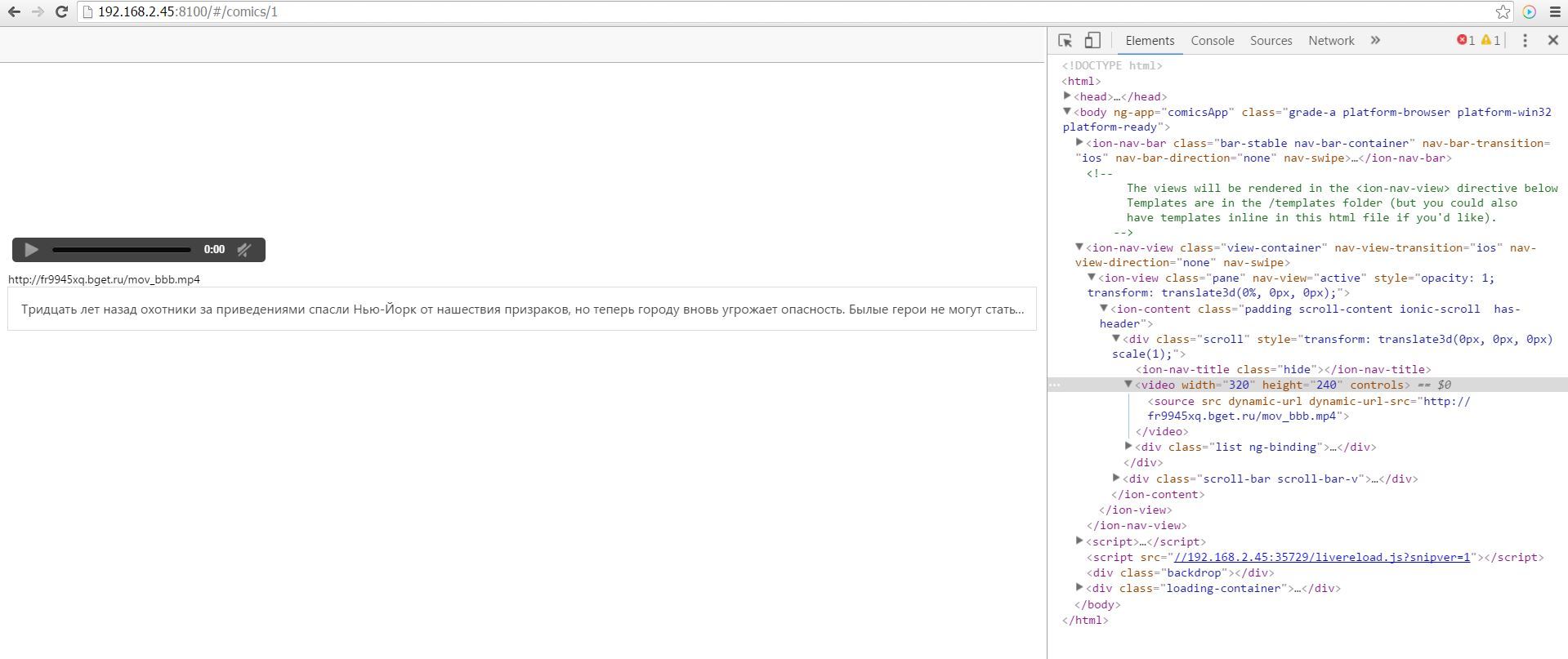
<video width="320" height="240" controls>
     <source src="" dynamic-url dynamic-url-src="{{video_url}}">
 </video>
directive:
app.directive('dynamicUrl', function () {
    return {
        restrict: 'A',
        link: function postLink(scope, element, attr) {
            element.attr('src', attr.dynamicUrlSrc);
        }
    };
});
That worked for me.
ddelor
December 8, 2014, 10:22am
8
Great solution, i had the same issue with an audio tag and it solved it
Hi,
I am using the following code. But its not working
in controller
    .controller('videoGalleryController', function ($scope, $stateParams, $http, $sce) {

        var id = $stateParams.id;

        $http.get(localStorage.getItem("targetLink") + "getVideo?Id=" + id)
                .success(function (data, status, headers, config) {
                    $scope.videogallery = data;
                })
                .error(function (data, status, headers, config) {
                })
    })
in html page
   <ion-item ng-repeat="videogal in videogallery" overflow-scroll="true">
       <video ng-src="{{videogal.videoPath}}" class="centerme" controls="controls" width="100%" height="auto"></video>
    </ion-item>
there is no ng-src for video and audio tags.
use my solution with the special directive, which adds the source afterwards
Nehmat
July 6, 2015, 7:07pm
13
This worked for me as well with an iframe tag thank you. had to make minor adjustments.
Hi Bengt, I’ve just tried it on my app, but it does not workj for me. I’ve just C&P your code (changing your video_url parameter with mine, obviously). Is there anything else I have to do?
thank you very much in advance.
Stefano
ps: no error shown in the console
in my case the video was in an invalid/unsupported format (audio or video format or unsupported codec). --> you could try to download a youtube video on your mobile device and test you app with that.
I had some format issues --> the video player is shown, but does not plays the video
My problem occurs before the compatibility check as no video is loaded. I tried that both in the ionic serve and on the device.
I’m not too confident with AngularJS custom directives: I created directives.js file and linked it in the index.html. Is there anything else to do?
That’s my code:
Directive:
angular.module('starter.directives', [])


.directive('dynamicUrl', [function () {
return {
    restrict: 'A',
    link: function postLink(scope, element, attr) {
        element.attr('src', attr.dynamicUrlSrc);
    }
}
}]);
`
and that’s the template:
<div class="card">
    <iframe src="" dynamic-url dynamic-url-src="{{data.urlVideo1}}" frameborder="0" width="560" height="315" allowfullscreen></iframe>
</div>
data.urlVIdeo1 contains a valid url.
Since this is an app for seeing and uploading videos, this problem is driving me nuts!!
i used the html video tag for that instead of iframe
Already tried that: the video tag is correctly shown, but no video is loaded in it…
I was thinking: is there any particular Angular resource / library I have to include to the project to make this code work?
did you see the correct video source in the sourcecode?
there should be everything in the ionic.bundle.js
You can try to use $sce-service to mark your resource as a trusted one.
THAT WAS THE KEY!!!
The $sceDelegateProvider. In the end, it worked even without the postLink in my Android Phone.
Thank you very much Bengt!!!
thanks! it works like a charm
Hello bengtler i use you solution but it is not working for me please help((((
it is your code in my controller.js
angular
    $scope.$on('$ionicView.enter', function(){
        $ionicLoading.show();

        Comics.getComics().then(function(response){
            _this.comics = response.data;
        }).catch(function(response){
            //request was not successful
            //handle the error
        }).finally(function(){
            $ionicLoading.hide();
        });
    });

})

.controller('ComicDetailController', function(Comics, $stateParams, $scope, $ionicLoading) {
    var _this = this;

    $scope.$on('$ionicView.enter', function(){
        $ionicLoading.show();

        Comics.getComic($stateParams.comicId).then(function(response){
            _this.comic = response.data;
        }).catch(function(response){
            //request was not successful
            //handle the error
        }).finally(function(){
            $ionicLoading.hide();
        });
    });
});

add.directive('dynamicUrl', function () {
return {
    restrict: 'A',
    link: function postLink(scope, element, attr) {
        element.attr('src', attr.dynamicUrlSrc);
    }
};
});