Hello,
I am experiencing a platform-specific issue when uploading large videos in an Ionic Angular application using Capacitor 7.
Environment
- Ionic Angular
- Angular 20
- Capacitor 7.6.x
- Android 13 physical device: Xiaomi Redmi Note 11 Pro
- Android API 36 emulator
- iPhone with iOS 18
- Files are selected using:
<input
  type="file"
  accept="video/*"
  (change)="onVideoSelected($event)"
>
The selected video is received as a JavaScript File.
Upload flow
The application first requests a signed Google Cloud Storage URL from the backend:
const signedUrlResponse = await fetch(
  `${apiUrl}/api-v2/document/upload?filename=${file.name}&contentType=${file.type}`,
  {
    method: 'GET',
    headers: {
      Authorization: `Bearer ${token}`,
    },
  }
);
Then it uploads the file directly to Google Cloud Storage:
await fetch(uploadTarget.url, {
  method: 'PUT',
  headers: {
    'Content-Type': file.type,
  },
  body: file,
});
My Capacitor configuration contains:
{
  "plugins": {
    "CapacitorHttp": {
      "enabled": true
    }
  }
}
Behaviour on iOS
With CapacitorHttp enabled, the upload works correctly on iOS.
I successfully uploaded a video with the following size:
File: IMG_0005.mov
Type: video/quicktime
Size: 120,265,640 bytes
Size: 114.69 MB
The native HTTP request returns:
status: 200
ok: true
Behaviour on Android
With the same code and CapacitorHttp enabled, large video uploads cause an OutOfMemoryError or kill the WebView renderer.
On an Android emulator with API level 36 android 16, the logs show:
DIRECT STORAGE UPLOAD
followed by:
Renderer process crash detected
Render process kill (OOM or update)
On a Xiaomi Redmi Note 11 Pro running Android 13, the logs show:
OutOfMemoryError
Failed to allocate a large byte array
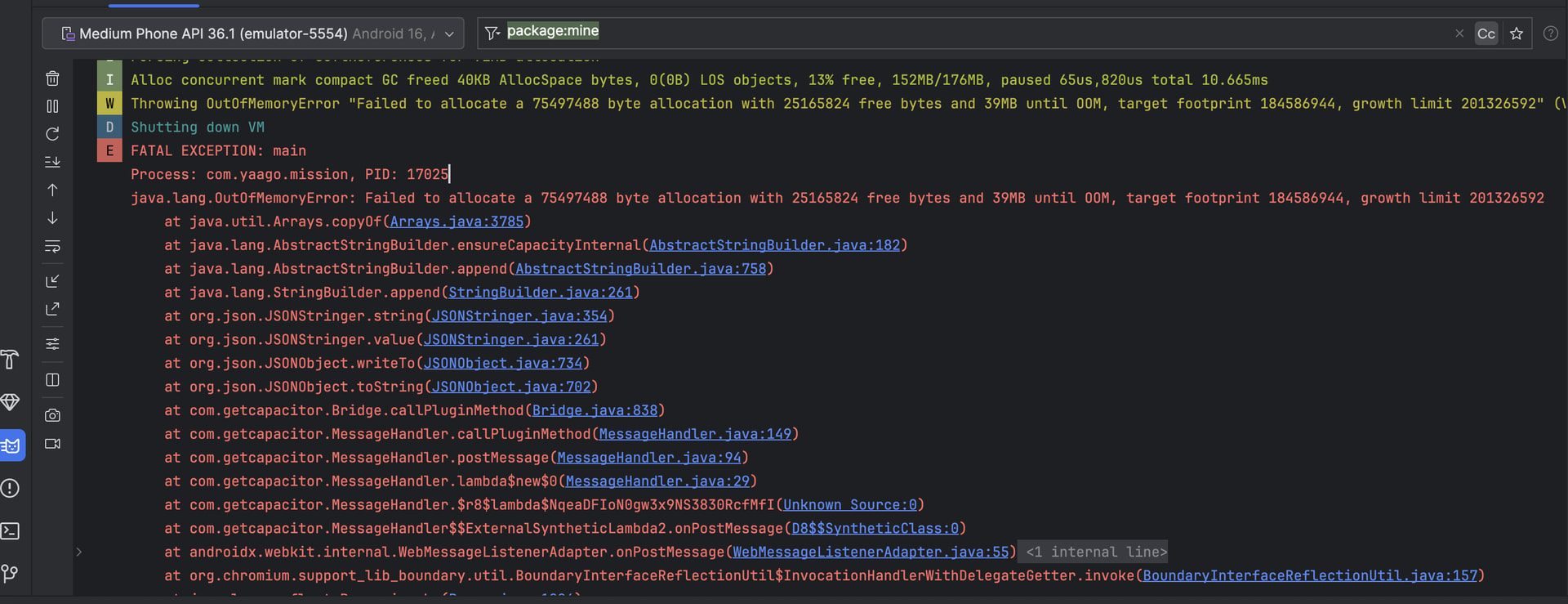
The crash happens before receiving the Google Storage response.
During my tests, the direct upload started becoming unstable at approximately 25–30 MB on Android.
Test without CapacitorHttp interception
When I remove:
"CapacitorHttp": {
  "enabled": true
}
The Android application no longer crashes.
But on iOS crache for a large direct upload to fail.
Legacy backend upload
I also have an older multipart upload endpoint:
const formData = new FormData();
formData.append('content', file, file.name);

await fetch(`${apiUrl}/api-v2/document`, {
  method: 'POST',
  headers: {
    Authorization: `Bearer ${token}`,
  },
  body: formData,
});
With CapacitorHttp disabled, this method works on Android for videos below approximately 50 MB.
Above 50 MB, the backend correctly returns:
413 Payload Too Large
Therefore, my temporary workaround is:
- iOS: direct upload to Google Storage using CapacitorHttp.
- Android videos below 50 MB: legacy multipart backend upload.
- Android videos above 50 MB: ask the user to compress or split the video.
==> However, to do that, ChatGPT advised me to replace capacitor.config.json with capacitor.config.ts so I could enable CapacitorHttp on iOS and disable it on Android.
Questions
Is it possible to enable the global CapacitorHttp fetch patch only for iOS and disable it for Android?
Is there a recommended way to upload a large File on Android without copying the entire file through the JavaScript/native bridge?
Would @capacitor/file-transfer be the recommended solution for uploading a file URI directly to a Google Cloud Storage signed URL?
Is there a supported way to obtain the original Android content:// URI when the file is selected through an HTML file input?
My assumption is that the Android crash occurs because the large File body is copied or serialized in memory by CapacitorHttp, while iOS handles the same request differently.
Any advice or recommended architecture would be appreciated.
Thank you.