Hi All,
I want to total the values of itemPrice from the selected items. Following is the code:
<ion-select multiple="true" okText="Select" cancelText="Cancel" required [(ngModel)]="retailerItemModel" formControlName="retailerItem" (ionChange)="onSelectChange($event)">
<ion-option *ngFor="let item of itemList | async" [value]="item.itemId">
{{item.itemName}} Rs.{{item.itemPrice}}
</ion-option>
</ion-select>
Following is the TS:
onSelectChange(items){
    console.log('Selected', items)
  }
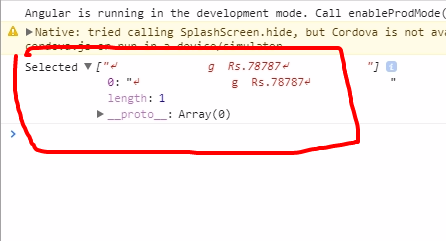
The problem is the console.log is showing all data … I need just the itemPrice and function to display totalPrice
Any suggestions?
try to use
onSelectChange( ){
    console.log(this.retailerItemModel)
  }
No… That shows the same data… The objective is to get the total… of each element in item
Hi, @togotech
Could If you want get itemPrize
<ion-select multiple="true" okText="Select" cancelText="Cancel" required [(ngModel)]="retailerItemModel" formControlName="retailerItem" (ionChange)="onSelectChange(retailerItemModel)">
<ion-option *ngFor="let item of itemList | async" [value]="item">
{{item.itemName}} Rs.{{item.itemPrice}}
</ion-option>
</ion-select>
Pass [value]=“item” and get price in function below example:
 onSelectChange(items){
    console.log('Selected', items.itemPrice)
  }
Thanks
Thanks. items.itemPrice shows ‘undefined’ but when I put items[0].itemPrice then I get the price value in console correctly! I need help in getting the sum value of all such ‘selected’ occurunces with itemPrice. … the totalPrice…
onSelectChange(items){
    let priceTotal = 0;
    let i = 0;
    items.forEach((itemPrice) => {
      priceTotal += Number(items[i].itemPrice)
    });
    return priceTotal;
  }
The problem is I can’t use priceTotal outside the function on the page with {{onSelect(items)}}… Any suggestion? The sum shows error sometimes… Need feedback
Make priceTotal global.
export class YourPage {
    priceTotal: number = 0;

constructor.....
Change this:
onSelectChange(items){
    priceTotal = 0;
    let i = 0;
    items.forEach((itemPrice) => {
      priceTotal += Number(items[i].itemPrice)
    });
  }
If I access {{onSelectItems(items)}}… The error shows
Cannot read property 'forEach' of undefined
To Output the value use
{{priceTotal}}
Change your Option like this:
<ion-option *ngFor="let item of itemList | async" [value]="item.itemId" (ionChange)="onSelectChange(itemList)">
{{item.itemName}} Rs.{{item.itemPrice}}
</ion-option>
Everytime you changed a Option the totalPrice should be calculated.
Cannot read property 'itemPrice' of undefined
Declared itemPrice: number… still the same issue
Try
console.log(item)
and check in thel Log if item has an itemPrice.
You do not show where, when, and how in your template you are trying to display this total. If you do this, and write the template before the controller, it should become naturally obvious to you what you must do.
I think the above codes are clear enough. Just for explanation… I am attempting to access Selected Items from the itemList with {{item.itemPrice}} … Although I am able to access the itemPrice and form a loop for summing it but I am not able to use it outside the function on the same page… All this is going on the same page
It’s not about clarity. It’s about you realizing how Angular works. Please just follow my instructions and see if you have an epiphany.
Waiting for the epiphany 
I am creating a Bill with multiple items to be selected on ion-select on BillCreatePage:
<ion-select multiple="true" okText="Select" cancelText="Cancel" required [(ngModel)]="retailerItemModel" formControlName="retailerItem" (ionChange)="onSelectChange(retailerItemModel)">
<ion-option *ngFor="let item of itemList | async" [value]="item.itemId">
{{item.itemName}} Rs.{{item.itemPrice}}
</ion-option>
</ion-select>
Then I want the total itemPrice:
<ion-item type="number" formControlName="billValue" name="billValue" ngDefaultControl>Total Bill    Value Rs. {{priceTotal}}
          </ion-item>
Following are the TS for BillCreatePage:
public priceTotal: 0;

onSelectChange(items){

    let i = 0;
    items.forEach((itemPrice: number) => {
      this.priceTotal += Number(items[i].itemPrice)
    });
  }
I am not getting the priceTotal…
Why do you have the total price as a form input? Isn’t it a read-only display element?
Why do you feel the need to pass anything to your change handler? All the information you need is in the bound retailerItemModel (which should be named something like selectedItems instead). Did you look at what is actually being passed to onSelectChange()? Is it what you expected? Why not?
What is retailerItemModel when onSelectChange() is called? Is it useful? It is being constructed from various values of what you have bound [value] to for each <ion-option>. Could you change what that is to make it more useful for your purposes?
You seem to have it as one.
No you don’t. You (should) already have the information you need in the property bound to the select itself.
What happens if you bind it to item instead?
No you don’t. You (should) already have the information you need in the property bound to the select itself.
Not sure what you mean? How will forEach work if it does not have selected items, to get the same?
Following are the changes:
HTML:
<ion-select multiple="true" okText="Select" cancelText="Cancel" required [(ngModel)]="selectedItems" formControlName="retailerItem" (ionChange)="onSelectChange(selectedItems)">
<ion-option *ngFor="let item of itemList | async" [value]="item">
{{item.itemName}} Rs.{{item.itemPrice}}
</ion-option>
</ion-select>
TS:
onSelectChange(item){
    let i = 0;
    item.forEach((itemPrice) => {
      this.priceTotal += item[i].itemPrice;
    });
    console.log(this.priceTotal);
  }
The console shows concatenation of undefined and the itemPrice value… undefined78787
You have the selected items in your bound retailerItemModel property.
I am asking you to think this through on your own so that you can really understand what is going on. That way, you can solve similar problems in the future. All throughout this thread you have just been robotically copying code exactly that other people have suggested. That is not a sustainable path to becoming a proficient programmer.