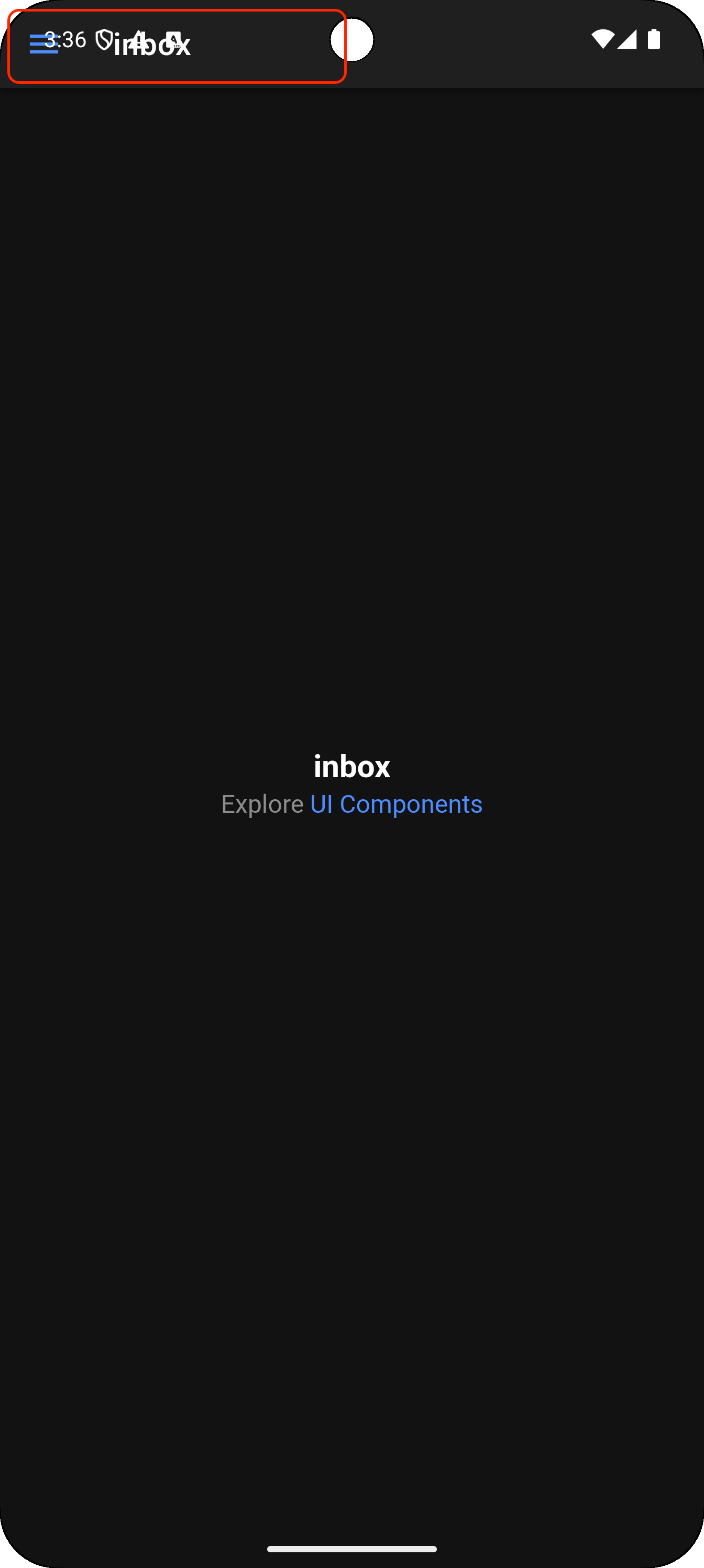
I recently decided to update an app I have to the latest ionic and angular libraries. When testing the android version, I saw that the toolbar is jammed all the way to the top of the device screen and the controls in the toolbar are unresponsive. Anyone know anything about this.
You can replicate this by creating a new angular, side menu project and then adding android. Simulators have the latest updates from google.
Details:
Ionic cli v7.2.1
package.json
"@angular/animations": "^20.0.0",
"@angular/common": "^20.0.0",
"@angular/compiler": "^20.0.0",
"@angular/core": "^20.0.0",
"@angular/forms": "^20.0.0",
"@angular/platform-browser": "^20.0.0",
"@angular/platform-browser-dynamic": "^20.0.0",
"@angular/router": "^20.0.0",
"@capacitor/android": "7.4.3",
"@capacitor/app": "7.0.2",
"@capacitor/core": "7.4.3",
"@capacitor/haptics": "7.0.2",
"@capacitor/keyboard": "7.0.2",
"@capacitor/status-bar": "7.0.2",
"@ionic/angular": "^8.0.0",
"ionicons": "^7.0.0",
"rxjs": "~7.8.0",
"tslib": "^2.3.0",
"zone.js": "~0.15.0"

Android simulators
Pixel pro 8
Pixel 6a

Android studio 2025.1.2 Patch 2