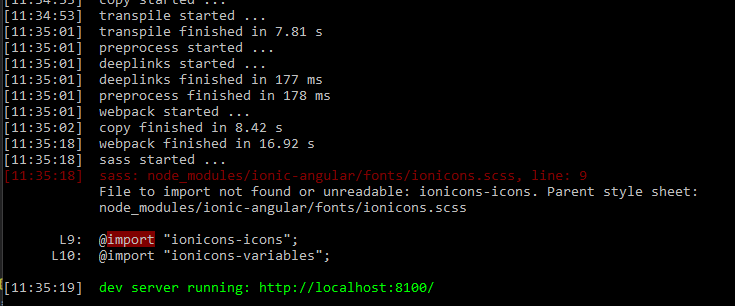
Sujan,
Thanks for your reply. Here is the info you asked for:
package.json
`{
“name”: “xxxx”,
“author”: “xxxx”,
“homepage”: “xxxx”,
“private”: true,
“scripts”: {
“ionic:build”: “ionic-app-scripts build --prod”,
“ionic:serve”: “ionic-app-scripts serve --dev”
},
“dependencies”: {
"@angular/common": “^4.2.3”,
"@angular/compiler": “^4.2.3”,
"@angular/compiler-cli": “^4.2.3”,
"@angular/core": “^4.2.3”,
"@angular/forms": “^4.2.3”,
"@angular/http": “^4.2.3”,
"@angular/platform-browser": “^4.2.3”,
"@angular/platform-browser-dynamic": “^4.2.3”,
"@angular/platform-server": “^4.2.3”,
"@ionic-native/android-fingerprint-auth": “^3.12.1”,
"@ionic-native/core": “^3.12.1”,
"@ionic-native/splash-screen": “^3.12.1”,
"@ionic-native/status-bar": “^3.12.1”,
"@ionic/cloud-angular": “^0.12.0”,
"@ionic/storage": “^2.0.1”,
“angular2-google-maps”: “^0.17.0”,
“gulp-sass”: “^3.1.0”,
“intl”: “^1.2.5”,
“ionic-angular”: “^3.4.2”,
“ionicons”: “3.0.0”,
“latest-version”: “^3.1.0”,
“lodash”: “^4.17.4”,
“mime-types”: “^2.1.15”,
“moment”: “^2.18.1”,
“rxjs”: “^5.4.1”,
“sw-toolbox”: “3.6.0”,
“uuid”: “^3.1.0”,
“zone.js”: “0.8.12”
},
“devDependencies”: {
"@ionic/app-scripts": “^1.3.7”,
“typescript”: “2.3.4”
},
“cordovaPlugins”: [
“cordova-plugin-whitelist”,
“cordova-plugin-console”,
“cordova-plugin-statusbar”,
“cordova-plugin-device”,
“cordova-plugin-splashscreen”,
“ionic-plugin-keyboard”,
“cordova-plugin-geolocation”,
“cordova-plugin-actionsheet”,
“uk.co.workingedge.phonegap.plugin.launchnavigator”,
“cordova-plugin-app-event”,
{
“id”: “phonegap-plugin-push”,
“locator”: “phonegap-plugin-push”,
“variables”: {
“SENDER_ID”: “xxxx”
}
},
“ionic-plugin-deploy”,
“cordova-plugin-touch-id”,
{
“locator”: “https://github.com/mapsplugin/cordova-plugin-googlemaps-sdk”,
“id”: “com.googlemaps.ios”
},
“cordova-plugin-camera”,
“cordova-plugin-badge”,
“cordova-plugin-googlemaps”
],
“cordovaPlatforms”: [],
“description”: “xxxxx.”
}
ionic info:
`Your system information:
ordova CLI: 6.5.0
Ionic Framework Version: 3.4.2
Ionic CLI Version: 2.2.2
Ionic App Lib Version: 2.2.1
Ionic App Scripts Version: 1.3.7
ios-deploy version: Not installed
ios-sim version: Not installed
OS: Windows 10
Node Version: v6.9.1
Xcode version: Not installed`
`