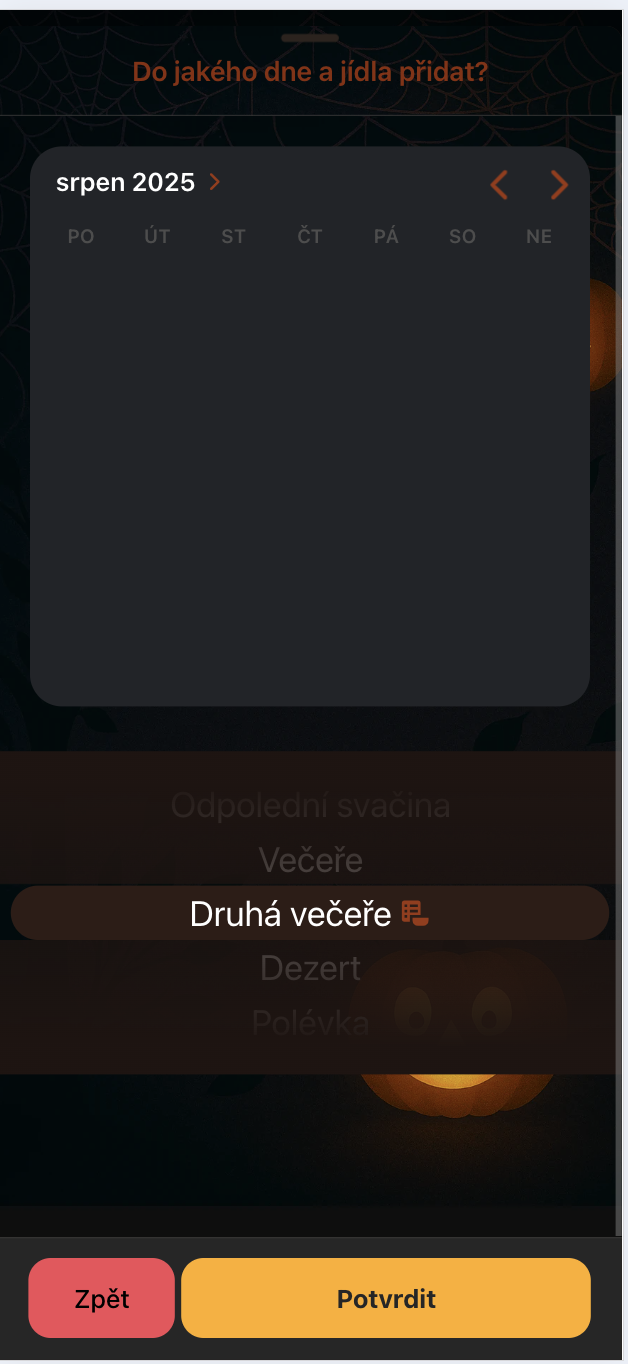
Hello. My ion-datetime calendar doesn’t render properly. The whole body has opacity: 0
I updated to Capacitor 7. I use ion-datime in an ion-modal where I have :keep-contents-mounted="true" that one works just fine..then I have one that gets triggered with a button, also no problem, and then I have one in a regular ion-modal with breakpoints and other components, see code below, and that one that doesn’t show calendar body. I checked the css and .calendar-body shadow dom class stays on opacity: 0 … why? If I add :keep-contents-mounted="true" it does render but then it messes edge to edge for the modal, and it renders below system buttons. Am I doing something wrong? It did work on Cap6.
Thank you
 <template>
    <ion-modal
        :is-open="openModal"
        :initial-breakpoint="types[calendarType].breakpoints[1]"
        :breakpoints="types[calendarType].breakpoints"
        :show-backdrop="openModal"
        @did-present="initializeCalendar"
        @did-dismiss="onDismiss"
        @ion-breakpoint-did-change="handleBreakpointChange"
    >
        <ion-header>
            <ion-toolbar>
                <ion-title class="text-secondary">{{ types[calendarType].title }}</ion-title>
            </ion-toolbar>
        </ion-header>
        <ion-content>
            <ion-datetime
                id="datetime"
                ref="dateTimePickerRef"
                v-model="displayDate"
                locale="cs-CZ"
                presentation="date"
                color="secondary"
                :highlighted-dates="highlightedDates"
                :first-day-of-week="1"
                @ion-change="changeDate"
            >
            </ion-datetime>

            <meal-type-picker
                v-if="!isDayDuplicate && !isPremiumMealPlanApply"
                ref="mealTypePickerRef"
                :other-day-meals="chosenDayMeals"
            />
        </ion-content>
        <button-footer :with-debounce="true" @go-back="openModal = false" @confirmed="checkDuplicates" />
    </ion-modal>
</template>
I have this class for it
 ion-datetime {
    margin: auto;
    border-radius: 20px;
}
Removing the class doesn’t change anything.

Thank you