I have an array data that I output in a ion-list as individual ion-items:
<ion-list class="showlist">
   <ion-item *ngFor="let show of data" (click)="tapShow($event, show)">
      ...
   </ion-item>
</ion-list>
This works just fine.
But now I need to give each ion-item its own ID attribute in the source code so I can select the list item for automated testing.
How do I best do that?
I tried putting a div inside the ion-item, but this messes with the CSS as Ionic internally creates a few more HTML elements and the div is thrown in the mix pretty random.
let i=index and #i – unless I misunderstand your question. But you can have the ngFor generate the id’s and use them as template id’s that way.
show even has an ID - but how do I apply that to the ion-item as a HTML attribute?
The syntax isn’t exactly extremely intuitive, but you can bind [attr.id].
2 Likes
I haven’t tried this, but I don’t see why it wouldn’t work.
<ion item *ngFor="let s of shows" [id]="s.id">
1 Like
Heh, I was debating going with that instead of [id] but I think the attr.x syntax is ugly. Do you know a reason to prefer it?
It’s only needed for pure (legacy?) HTML attributes that don’t map to properties. The canonical example in the Angular docs is:
<td [colspan]="n">bummer</td>
<td [attr.colspan]="n">happiness</td>
Thanks, this does work (in principle)!
show is actually of form { title: "foo", ids: { bar: 123 } }.
If I use [attr.id]="show.ids.bar" I get this strange error:
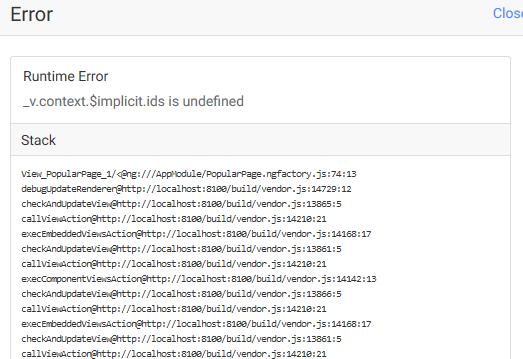
When I use [attr.id]="show.title" everything works as expected. Does this make sense to one of you?
Yes, this is indeed running in Firefox right now. Is this relevant?
It’s a special error. I don’t understand it well, but you probably have a naming problem, like two different things named “bar” and the way the template is parsing gets confused.
1 Like
Oh indeed it is, the error message makes much more sense in Chrome: “Cannot read property … of undefined”. Which is true, because I initialize this with a “skeleton” array that only has empty entries - that are missing ids.
What a shitty error message from Firefox - and really unexpected for it to be different from Chrome as well!