Http get request return status 0

My friend I think is a problem with your code, look, my advice is for you to get a 4.4 version of android and run the inspect devices on google chrome because you will see all errors, It could be your missing a dependency something else so since this is very frustrating at the begging you should do this.
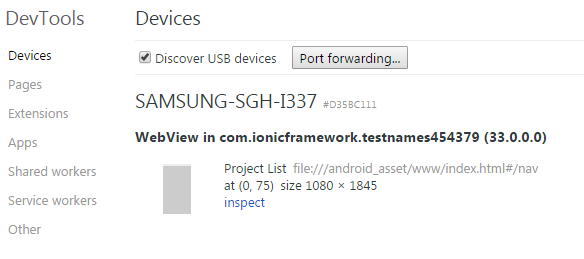
get here on the screen shoot


then you will see this if you phone is android 4.4 and api 19, less than that wont show up here, and when you do ionic run android, turn off all your emulators and the app will be install and show something like this
image
click inspect and the is a debugger like the developers tools from chrome or firebug from firefox

i’m using android 4.2 (samsung s3) ionic 1.3.22 :frowning:

How you debug it? I had one 4.2 and I could no find another solution to debug it, then I upgrade to another phone to use the google debugger like I show on the screenshots

i ran and device is displayed but the run command app is not getting displayed

Actually I just run ionic server and it runs on my web browser and also there are 2 more ways to debug

se this link

it works fine with ionic serve. but if i run from mobile device it display status 0

What is your cordova version?

With cordova 5.0 you have to add the whitelist plugin to be able to connect to external sources.

And you have to allow your external sources or everything.

Status 0 means that the client has canceled the request like -> timeout, aborting, no connection, cors, …

yes i have codova 5.0.
Now it works! you saved my life man :smiley:

Thannk you very much it seems to be ok thanks a lot

Thank you very much to everyone helped me. The app is working really fine

Thats Nice Im glad you fix it , Can you please point what was the problem on your case ? wasthe version of your cordova the problem?

ho I see the white plugin fix it right ?

it was the whitelist plugin missing

Install this plugin

ionic plugin add cordova-plugin-whitelist

you can see doc at https://github.com/apache/cordova-plugin-whitelist

Seems like you just need to add <access origin="*"> to the config.xml file. I am using this without issue with Cordova 5.0 without the whitelist plugin.

i guess the correct answer is posted by @bengtler since The whitelist code was moved out of core Cordova and into a new Cordova whitelist plugin check this article :
Cordova newsflash

Also i recommend anyone to check the response using postman " A chrome REST client " to see if the endPoint is actually return any data.

Hi, I have the same problem with cordova-plugin-whitelist already installed …i use cordova 5.4.0 and ionic 1.7.13 do you have an answer?

did you allow your hosts? or all traffic in config.xml or as meta-tag in the index.html

Yes , I’ve already followed readme file but nothing on android…

thank you very much… I solved removing and adding android platform from project

I am also facing the same issue. Not able to solve the problem. I am using following versions of ionic and cordova.
Ionic : 1.7.14
cordova : 6.1.1

I have already installed whitelist plugin in my app and added the following lines in the config.xml.

Also try to remove android platform. but the issue remains same.

Please suggest. All suggestions are welcome.